








Beta
The Neon Auth with Better Auth is in Beta. Share your feedback on Discord or via the Neon Console.
Neon Auth is built on Better Auth and provides support for Admin plugin APIs through the Neon SDK. You do not need to manually install or configure the Better Auth Admin plugin.
The Admin plugin provides APIs to manage your users and their authentication state. It’s commonly used to build internal tooling (admin dashboards, support tools) that can:
- Create and update users
- Assign roles
- Ban and unban users
- List and revoke sessions
- Impersonate a user for support/debugging
Prerequisites
-
A Neon project with Auth enabled
-
An existing user with an admin role to call Admin APIs.
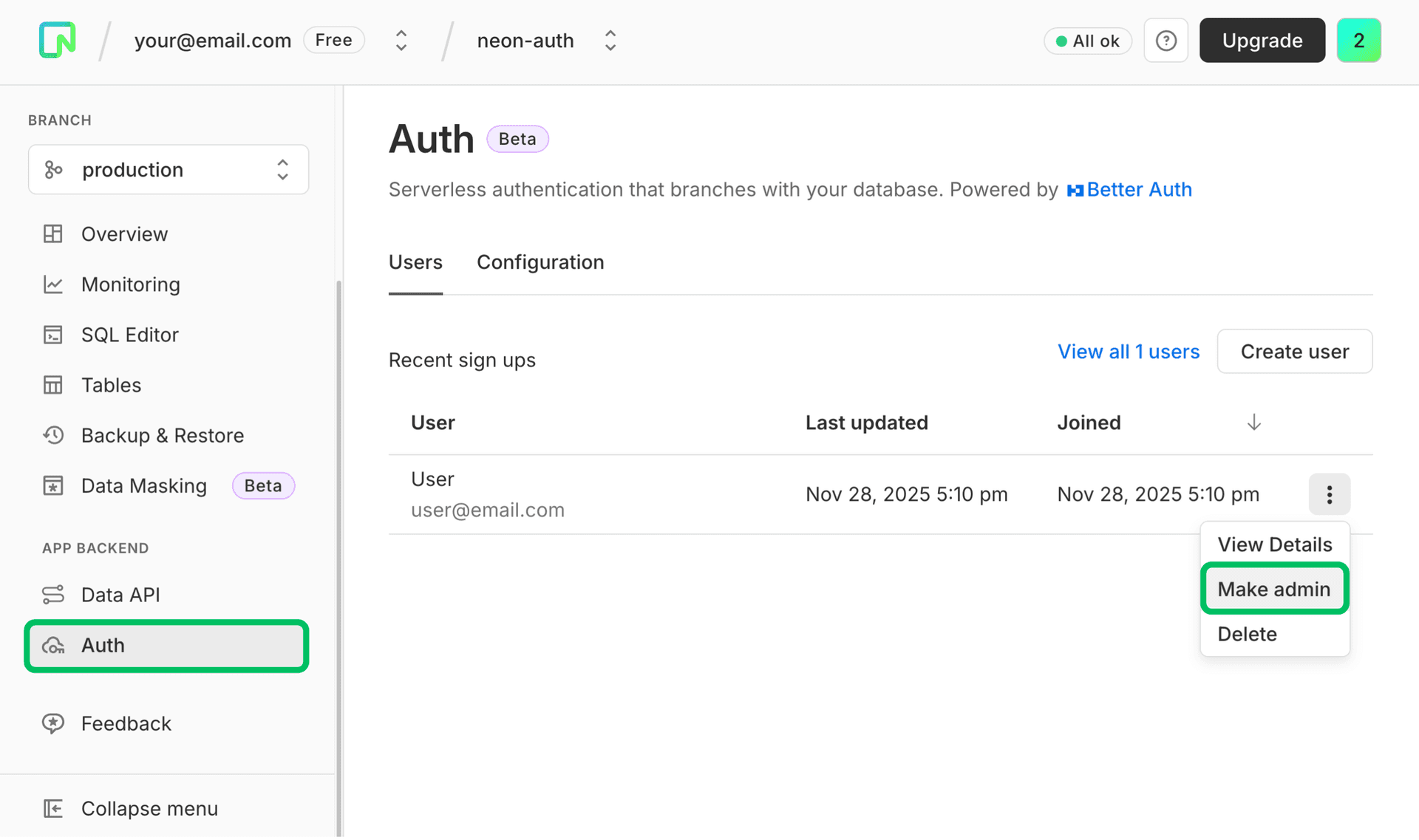
You can assign the admin role to a user through the Neon Console. Navigate to Auth → Users, open the three‑dot menu next to the user, and select Make admin.
Use Admin with SDK methods
You can call Admin plugin methods using the Neon SDK auth client.
If you haven’t set up Neon Auth yet, follow our Quick start guides to get started and create an
authClient.
Create a user
Use the Admin APIs to create users on behalf of others (for example, back-office onboarding).
Parameters
View parameters
| Parameter | Type | Required | Notes |
|---|---|---|---|
| string | ✓ | Email address for the new user | |
| password | string | ✓ | Password for the new user |
| name | string | ✓ | Display name |
| role | string | string[] | undefined | Optional role(s) for the user (for example: user, admin) | |
| data | Record<string, any> | undefined | Optional custom fields |
const { data, error } = await authClient.admin.createUser({
  email: 'user@email.com',
  password: 'secure-password',
  name: 'User Name',
  role: 'user',
  data: { customUserField: 'value' },
});
List users
List users with optional search, filtering, sorting, and pagination.
Parameters
View parameters
| Parameter | Type | Required | Notes |
|---|---|---|---|
| searchValue | string | undefined | Value to search for | |
| searchField | 'email' | 'name' | undefined | Field to search in | |
| searchOperator | 'contains' | 'starts_with' | 'ends_with' | undefined | Search operator | |
| limit | number | string | undefined | Max users to return (page size) | |
| offset | number | string | undefined | Number of users to skip (pagination) | |
| sortBy | string | undefined | Field to sort by | |
| sortDirection | 'asc' | 'desc' | undefined | Sort direction | |
| filterField | string | undefined | Field to filter by | |
| filterValue | string | number | boolean | undefined | Filter value | |
| filterOperator | 'eq' | 'ne' | 'lt' | 'lte' | 'gt' | 'gte' | undefined | Filter operator |
const { data, error } = await authClient.admin.listUsers({
  query: {
    // Following parameters are optional
    searchValue: 'text to search',
    searchField: 'email',
    searchOperator: 'contains',
    limit: 10,
    offset: 0,
    sortBy: 'name',
    sortDirection: 'asc',
  },
});
Use
filterField,filterValue, andfilterOperatorto further filter results (for example, by role etc)
The data object contains a list of users and pagination metadata:
{
  users: [/* array of user objects */],
  total: 100, // total number of users matching the query
  limit: 10,  // limit used in the query
  offset: 0   // offset used in the query
}
Use the total, limit, and offset values to implement pagination in your admin tooling.
Set a user role
Assign roles to control who can call admin operations.
Parameters
View parameters
| Parameter | Type | Required | Notes |
|---|---|---|---|
| userId | string | ✓ | The user ID to update |
| role | string | string[] | ✓ | Role(s) to apply (for example, admin) |
const { error } = await authClient.admin.setRole({ userId: 'user-id', role: 'admin' });Set a user password
Set or reset a user’s password.
View parameters
| Parameter | Type | Required | Notes |
|---|---|---|---|
| userId | string | ✓ | The user ID to update |
| newPassword | string | ✓ | The new password |
const { error } = await authClient.admin.setUserPassword({
  userId: 'user-id',
  newPassword: 'new-secure-password',
});
Update user details
Update user information such as email, name, and custom fields.
View parameters
| Parameter | Type | Required | Notes |
|---|---|---|---|
| userId | string | ✓ | The user ID to update |
| data | Record<string, any> | ✓ | Fields to update (email, name, custom fields) |
const { error } = await authClient.admin.updateUser({
  userId: 'user-id',
  data: { name: 'New Name' },
});
Ban user
Banning prevents sign-in for a user. You can optionally provide a reason and expiration for the ban.
View parameters
| Parameter | Type | Required | Notes |
|---|---|---|---|
| userId | string | ✓ | The user ID to ban |
| banReason | string | undefined | Reason for the ban | |
| banExpiresIn | number | undefined | Duration in seconds until the ban expires. If not provided, the ban does not expire |
const { error } = await authClient.admin.banUser({
  userId: 'user-id',
  banReason: 'Policy violation',
  // banExpiresIn: 60 * 60 * 24, // optional (seconds)
});
Unban user
Unban a previously banned user.
View parameters
| Parameter | Type | Required | Notes |
|---|---|---|---|
| userId | string | ✓ | The user ID to unban |
const { error } = await authClient.admin.unbanUser({ userId: 'user-id' });Manage sessions
Use session APIs to view active sessions and revoke them.
List sessions
View parameters
| Parameter | Type | Required | Notes |
|---|---|---|---|
| userId | string | ✓ | The user ID whose sessions you want to list |
const { data, error } = await authClient.admin.listUserSessions({ userId: 'user-id' });Revoke a session
View parameters
| Parameter | Type | Required | Notes |
|---|---|---|---|
| sessionToken | string | ✓ | The session token to revoke |
const { error } = await authClient.admin.revokeUserSession({ sessionToken: 'session-token' });Revoke all sessions
View parameters
| Parameter | Type | Required | Notes |
|---|---|---|---|
| userId | string | ✓ | The user ID whose sessions you want to revoke |
const { error } = await authClient.admin.revokeUserSessions({ userId: 'user-id' });Impersonate a user
Impersonation creates a session that behaves like the target user (useful for support and debugging).
View parameters
| Parameter | Type | Required | Notes |
|---|---|---|---|
| userId | string | ✓ | The user ID to impersonate |
const { data, error } = await authClient.admin.impersonateUser({ userId: 'user-id' });Stop impersonation
Stop an active impersonation session.
View parameters
This method does not take any parameters.
const { error } = await authClient.admin.stopImpersonating();Limitations
- Admin operations require an authenticated session (HTTP-only cookies). This means your admin tooling must run on the same site that can send those cookies to the Neon Auth API.
- Impersonation sessions are intentionally time‑limited, lasting for the duration of the active browser session or up to 1 hour. This design helps minimize security risks associated with long‑lived impersonation.
Need help?
Join our Discord Server to ask questions or see what others are doing with Neon. For paid plan support options, see Support.