








Need to test against production data without exposing sensitive information? Anonymized branches let you create development copies with masked personally identifiable information (PII) - such as emails, phone numbers, and other sensitive data.
Neon uses PostgreSQL Anonymizer for static data masking, and applies masking rules when you create or update the branch. This approach gives you realistic test data while protecting user privacy and supporting compliance requirements like GDPR.
Key characteristics:
- Static masking: Data is masked once during branch creation or when you rerun anonymization
- PostgreSQL Anonymizer integration: Uses the PostgreSQL Anonymizer extension's masking functions
- Branch-specific rules: You can define different masking rules for each anonymized Neon branch
Static versus dynamic masking
This feature uses static masking, which permanently transforms data in the branch when anonymization runs. Unlike dynamic masking (which masks data during queries), static masking creates an actual masked copy of the data. To get fresh data from the parent, create a new anonymized branch.
Create a branch with anonymized data
Select Anonymized data as the data option when creating a new branch.
- Navigate to your project in the Neon Console
- Select Projects -> Branches from the sidebar
- Click New Branch
- In the Create new branch dialog:
- Select your Parent branch (typically
productionormain) - (Optional) Enter a Branch name
- (Optional) Automatically delete branch after is checked by default with 1 day selected. You can change it, uncheck it, or leave it as is to automatically delete the branch after the specified time.
- Under data options, select Anonymized data
- Select your Parent branch (typically
- Click Create
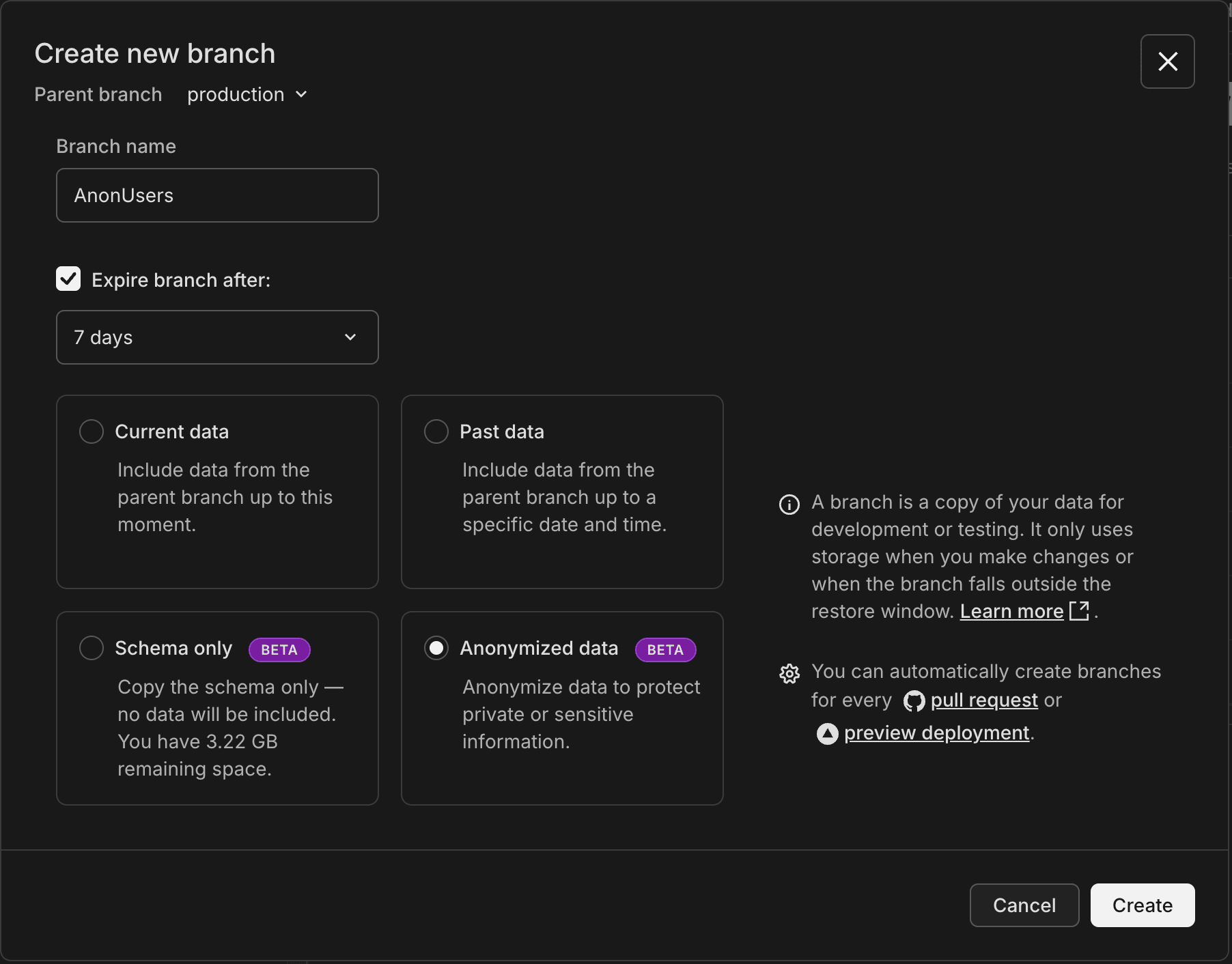
After creation, the Console loads the Data Masking page where you define and execute anonymization rules for your branch.
How anonymization works
When you create a branch with anonymized data:
- Neon creates a new branch with the schema and data from the parent branch.
- You define masking rules for tables and columns containing sensitive data. You can use any combination of these methods:
- Console: The Data Masking page opens automatically after branch creation.
- API: Include masking rules in the creation request or add them later via the masking rules endpoint.
- SQL: Connect to the branch (after initial anonymization) and use
SECURITY LABELcommands.
- You apply the masking rules (in Console, click Apply masking rules; via API, call the start anonymization endpoint), and the PostgreSQL Anonymizer extension masks the branch data.
- You can update rules and rerun anonymization on the branch as needed.
The parent branch data remains unchanged. Rerunning anonymization applies rules to the branch's current (already masked) data, not fresh data from the parent.
note
The branch is unavailable for connections while anonymization is in progress.
Manage masking rules
You can create and manage masking rules via the Console, API, or SQL. All three methods are interchangeable and produce equivalent results.
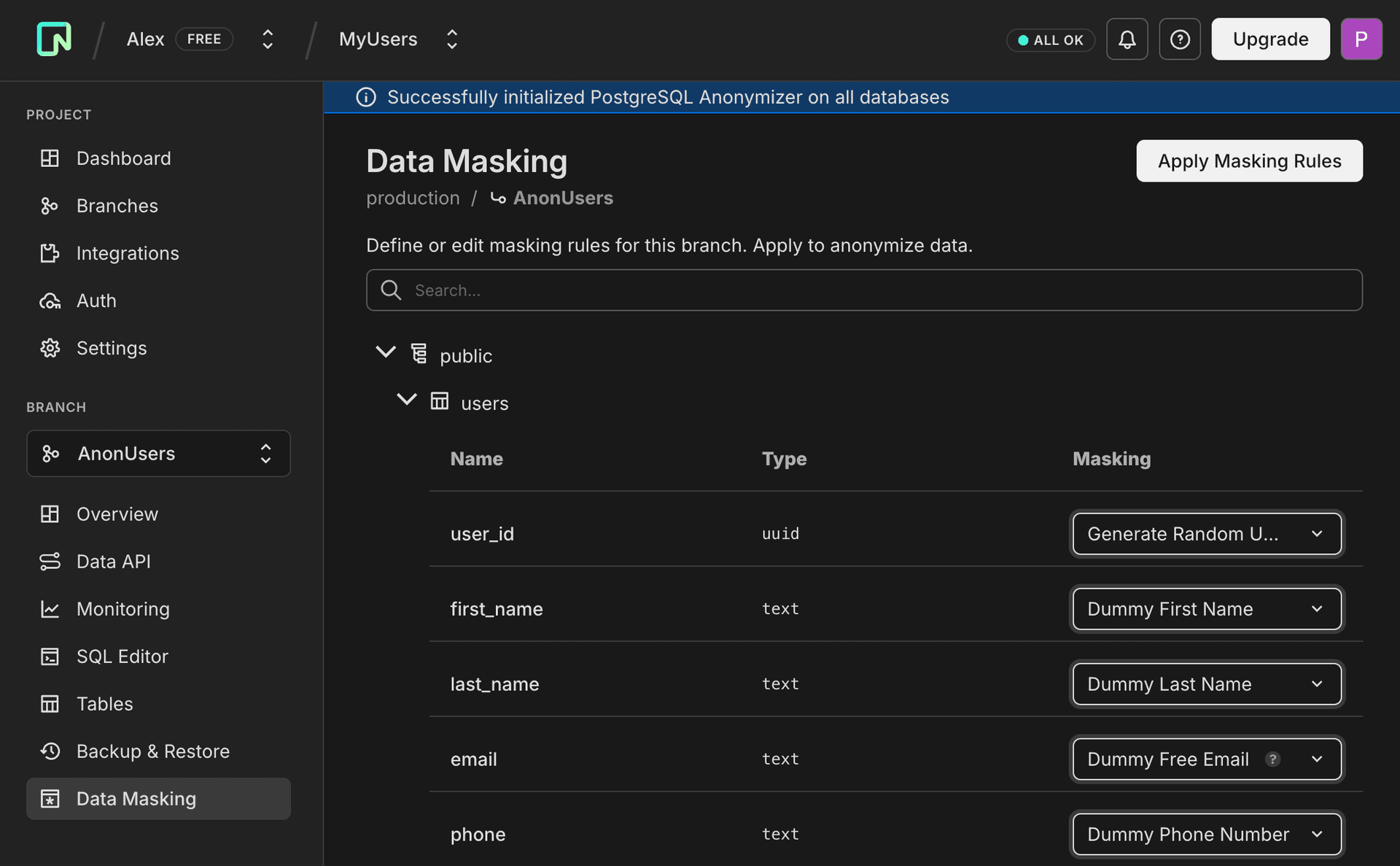
From the Data Masking page:
- Select the schema, table, and column you want to mask.
- Choose a masking function from the dropdown list (e.g., Dummy Free Email to execute
anon.dummy_free_email()). The Console provides a curated list of common functions. For the full set of PostgreSQL Anonymizer functions, you must use the API or SQL.
tip
For email columns with unique constraints, use Random Unique Email, which generates UUID-based emails that maintain uniqueness while preserving the email format.
usage notes
- Foreign key columns cannot be masked directly to maintain referential integrity. If you attempt to mask a foreign key column, the Console will display an alert with a "Go to primary key" action that navigates to the corresponding primary key column where you can apply masking rules. Primary key columns can be anonymized. Neon automatically handles foreign key constraints during the anonymization process to maintain referential integrity across related tables.
- If you've defined custom masking rules via the API or SQL (such as custom PostgreSQL expressions like
pg_catalog.concat(anon.dummy_uuidv4(), '@customdomain.com')that aren't available in the Console's dropdown), these rules will display as text in the Console showing the underlying expression. The Console preserves these custom rules when you run anonymization. You can safely mix Console, API, and SQL workflows.
- Repeat for all sensitive columns.
- When you are ready, click Apply masking rules to start the anonymization job. You can monitor its progress on this page or via the API.
important
Rerunning the anonymization process on the anonymized branch applies rules to previously anonymized data, not fresh data from the parent branch. To start from the parent's original data, create a new anonymized branch.
Retrieve masking rules
You can view existing masking rules via the Console, API, or SQL.
From the Data Masking page, all defined masking rules are displayed for each table and column. Rules using standard functions appear as dropdown selections, while custom rules (functions not available in the Console dropdown) appear as text showing the underlying PostgreSQL expression.
Common workflow
- Create an anonymized branch from your production branch.
- Define masking rules for sensitive columns (emails, names, addresses, etc.).
- Apply the masking rules.
- Connect your development environment to the anonymized branch.
- When you need fresh data, create a new anonymized branch.
Limitations
- Currently cannot reset to parent, restore, or delete the read-write endpoint for anonymized branches.
- Branch is unavailable during anonymization.
- Masking does not fully enforce database constraints, but improvements are ongoing. For example, use Random Unique Email for columns with unique constraints on emails.
- Foreign key columns cannot be masked directly. To maintain referential integrity, mask the corresponding primary key column instead. Neon automatically handles foreign key constraints during anonymization, temporarily modifying them to cascade updates and restoring them to their original state after the process completes. The Console displays an alert with a "Go to primary key" action that navigates to the relevant primary key column.
- Anonymized branches do not currently support projects with IP Allow or Private Networking enabled.
- The Console provides a curated subset of masking functions for creation. Use the API or SQL for all PostgreSQL Anonymizer masking functions.
Related resources
- Data Anonymization API Reference - Complete API documentation with request/response examples
- Data Anonymization with GitHub Actions - Automate anonymized branch creation in CI/CD
- PostgreSQL Anonymizer documentation
- Neon branching overview
- Neon API reference