








Neon uses PgBouncer to provide connection pooling, enabling up to 10,000 concurrent connections. This guide explains how pooling works, when to use it, and how to avoid common issues.
Why connection pooling matters
Each Postgres connection creates a new process in the operating system, consuming memory and CPU resources. Postgres limits the number of connections based on available RAM. In Neon, this limit is defined by max_connections, which varies by compute size:
| Compute size (CU) | RAM | max_connections |
|---|---|---|
| 0.25 | 1 GB | 104 |
| 0.50 | 2 GB | 209 |
| 1 | 4 GB | 419 |
| 2 | 8 GB | 839 |
| 3 | 12 GB | 1258 |
| 4 | 16 GB | 1678 |
| 5 | 20 GB | 2098 |
| 6 | 24 GB | 2517 |
| 7 | 28 GB | 2937 |
| 8 | 32 GB | 3357 |
| 9 - 56 | 36 - 224 GB | 4000 |
note
For compute sizes 9 CU and above, max_connections is capped at 4000 regardless of RAM size. See Postgres settings that differ by compute size for details.
note
Seven connections are reserved for the Neon superuser account. For a 0.25 CU compute, this means 97 connections are available for your application (104 total - 7 reserved).
Common scenarios that exceed these limits:
- Serverless functions (each invocation may open a connection)
- Connection-per-request web frameworks
- Multiple application instances without proper connection management
- Applications that don't close connections properly
Check your current limit:
SHOW max_connections;View active connections:
SELECT usename, count(*)
FROM pg_stat_activity
WHERE datname = '<database_name>'
GROUP BY usename;
You can also view active connections on the Monitoring page in the Neon Console, which provides a visual graph of connection usage over time.
How Neon's connection pooling works
Connection pooling solves the max_connections limit by maintaining a pool of reusable connections. Instead of opening a new Postgres connection for each client, PgBouncer routes multiple client connections through a smaller pool of actual Postgres connections.
The diagram shows how multiple client connections from different users route through separate PgBouncer pools (one per user/database combination), which share a limited number of actual Postgres connections to access the databases.
Key concept: Per-user, per-database pools
An important thing to understand about Neon's connection pooling:
PgBouncer creates separate pools for each combination of database user and database name. This means:
- User
user1connecting todatabase1gets one pool - User
user2connecting todatabase1gets a separate pool - User
user1connecting todatabase2gets another separate pool
Each pool has a maximum size defined by default_pool_size. In Neon, this is configured as:
default_pool_size = 0.9 × max_connectionsFor details on how max_connections is set based on compute size, see Parameter settings that differ by compute size.
Example with a 1 CU compute:
max_connections= 419default_pool_size= 377 (90% of 419)
This means:
- User
user1can have up to 377 active transactions todatabase1through the pooler - User
user2can simultaneously have up to 377 active transactions to the samedatabase1database - User
user1can also have up to 377 active transactions to a different databasedatabase2
All of these pools share the underlying max_connections limit (419 in this example).
Connection pooling vs concurrent queries
Important: The 10,000 connection limit does not mean 10,000 simultaneous query results.
- 10,000 = Maximum number of client connections PgBouncer can accept
- ~377 (for 1 CU) = Maximum concurrent active transactions per user per database
- 419 (for 1 CU) = Maximum concurrent connections to actual Postgres
The 10,000 limit is useful for applications with many idle or short-lived connections, such as serverless functions where connections are opened and closed frequently.
Understanding connection pool limits
Three types of limits
| Limit Type | Value | What it controls | When you hit it |
|---|---|---|---|
max_client_conn | 10,000 | Maximum client connections to PgBouncer | Client gets: "no more connections allowed" |
default_pool_size | 90% of max_connections | Maximum active connections per user per database | Client waits in queue (2 min timeout) |
max_connections | Varies by compute | Direct connections to Postgres | Client gets: "too many connections" |
What happens when you hit limits
Scenario 1: Hitting the per-user-per-database pool limit
You have a 1 CU compute (default_pool_size = 377). User user1 opens 377 connections to database1, all running long queries:
Connection 378 from user1 to database1 → Waits in queue
After 2 minutes → Error: "query_wait_timeout"
Solution:
- Ensure transactions complete quickly
- Use a larger compute size (increases pool size)
- Use multiple database users to get additional pools
Scenario 2: Hitting the global client connection limit
Your application opens 10,001 client connections to PgBouncer:
Connection 10,001 → Error: "no more connections allowed (max_client_conn)"Solution:
- Fix connection leaks in your application
- Implement client-side connection pooling
- Reduce the number of application instances
Scenario 3: Hitting max_connections with direct connections
Using a non-pooled connection string with a 0.25 CU compute (104 max_connections):
Connection 105 → Error: "FATAL: remaining connection slots are reserved"Solution:
- Use a pooled connection string (add
-poolerto hostname) - Increase compute size
- Implement connection pooling in your application
How to use connection pooling
To enable connection pooling, use a pooled connection string. Add -pooler to your endpoint ID:
Direct connection (no pooling):
postgresql://user1:AbC123dEf@ep-cool-darkness-123456.us-east-2.aws.neon.tech/dbname?sslmode=requirePooled connection:
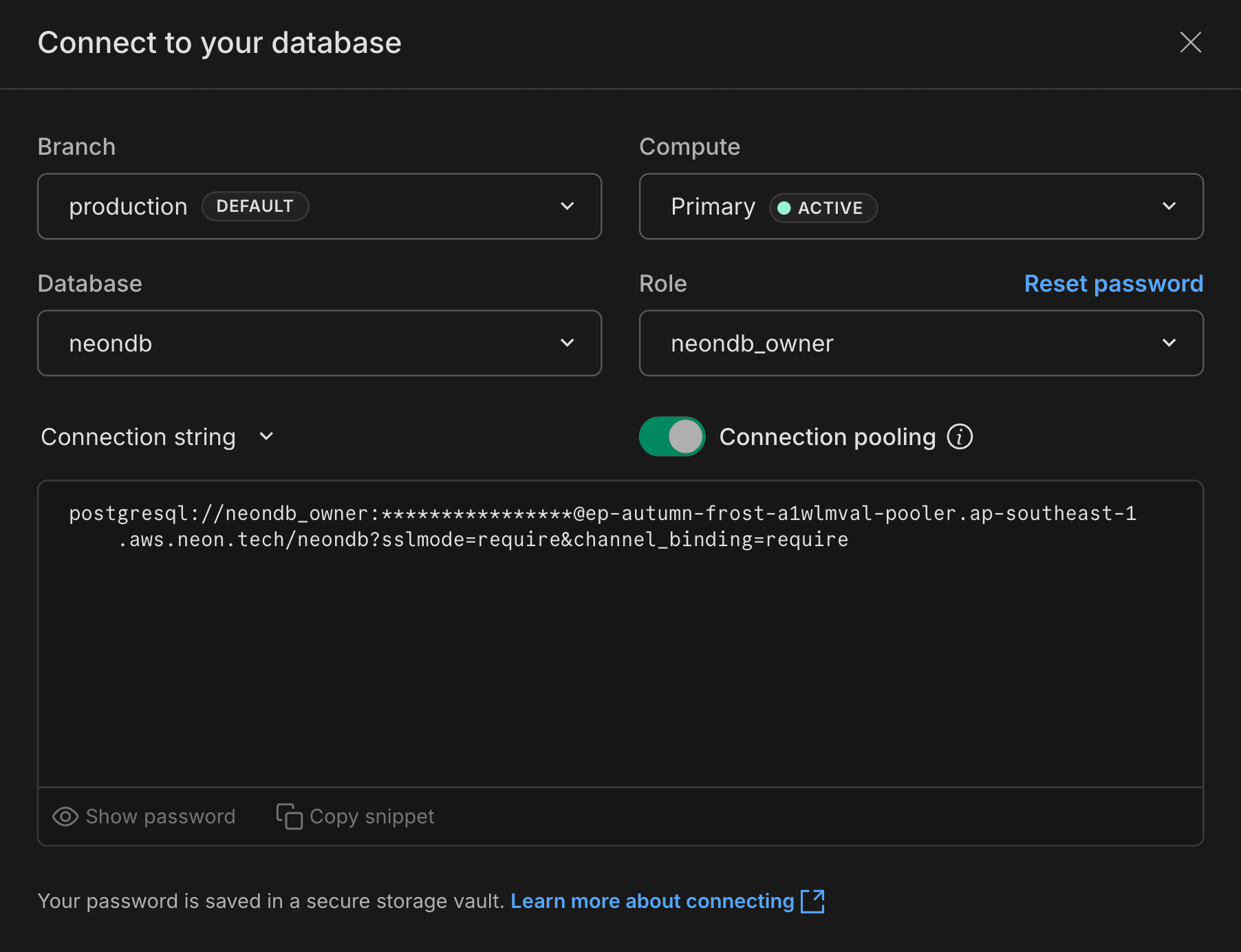
postgresql://user1:AbC123dEf@ep-cool-darkness-123456-pooler.us-east-2.aws.neon.tech/dbname?sslmode=requireYou can copy a pooled connection string from the Neon Console by clicking Connect on your Project Dashboard and enabling the Connection pooling toggle.
When to use pooled vs direct connections
| Use Case | Connection Type | Why |
|---|---|---|
| Serverless functions | Pooled | Many short-lived connections |
| Web applications | Pooled | Multiple concurrent requests |
| Connection-per-request frameworks | Pooled | High connection churn |
| Schema migrations | Direct | Tools may not support transaction pooling |
| Long-running analytics queries | Direct | Avoid pool contention |
pg_dump / pg_restore | Direct | Uses SET statements |
| Logical replication | Direct | Requires persistent connection |
| Admin tasks | Direct | May need session-level features |
Connection pooling in transaction mode
Neon uses PgBouncer in transaction mode (pool_mode=transaction), which means connections are returned to the pool after each transaction completes. This limits some Postgres features that require persistent sessions:
Not supported with pooled connections:
SET/RESET(session variables)LISTEN/NOTIFYWITH HOLD CURSORPREPARE/DEALLOCATE(SQL-level prepared statements)- Temporary tables with
PRESERVE/DELETE ROWS LOADstatement- Session-level advisory locks
Common issues with SET statements
The most common issue users encounter is with SET statements, particularly SET search_path.
Problem example:
SET search_path TO myschema;
SELECT * FROM mytable;  -- Works in this transaction
-- Transaction ends, connection returns to pool
SELECT * FROM mytable;  -- ERROR: relation "mytable" does not exist
Solutions:
- Use a direct connection when you need persistent session settings
- Specify schema explicitly in your queries:
SELECT * FROM myschema.mytable - Set at the role level (persists across transactions):
ALTER ROLE user1 SET search_path TO myschema, public;
This issue also affects tools like pg_dump, which relies on SET statements. Always use direct connections for pg_dump.
For the complete list of limitations, see the PgBouncer features documentation.
Neon PgBouncer configuration
Neon's PgBouncer configuration:
[pgbouncer]
pool_mode=transaction
max_client_conn=10000
default_pool_size=0.9 * max_connections
max_prepared_statements=1000
query_wait_timeout=120
Configuration details:
pool_mode=transaction: Connections are returned to the pool after each transactionmax_client_conn=10000: Maximum number of client connections PgBouncer acceptsdefault_pool_size: Maximum concurrent connections per user per database (90% ofmax_connections)max_prepared_statements=1000: Maximum protocol-level prepared statements per connectionquery_wait_timeout=120: Maximum time (seconds) a query waits for a connection from the pool
These settings are not user-configurable.
Pool lifecycle and compute restarts
Connection pools help minimize disruption during compute restarts (maintenance, updates, or scaling):
- Automatic reconnection: Production connection pools detect stale connections and replace them
- Health checks: Configure validation queries (
pool_pre_pingin SQLAlchemy, validation in HikariCP) to test connections before use - Connection lifecycle tuning: Settings like
maxLifetime(HikariCP) oridleTimeoutMillis(node-postgres) refresh connections periodically - Retry logic integration: Combined with retry logic and exponential backoff, pools provide resilience during brief interruptions
For complete guidance, see Building resilient applications with Postgres.
Protocol-level prepared statements
PgBouncer supports protocol-level prepared statements (as of PgBouncer 1.22.0), which can improve query performance and security.
Note: SQL-level PREPARE and EXECUTE statements are not supported with PgBouncer. You must use protocol-level prepared statements through your database driver.
Example with JavaScript (pg):
const query = {
  name: 'fetch-user',
  text: 'SELECT * FROM users WHERE username = $1',
  values: ['alice'],
};
await client.query(query);
Example with Python (psycopg2):
cur = conn.cursor()
query = "SELECT * FROM users WHERE username = %s;"
cur.execute(query, ('alice',), prepare=True)
results = cur.fetchall()
Benefits of prepared statements:
- Performance: Query parsing and planning happens once, speeding up repeated executions
- Security: Reduces SQL injection risk by separating query structure from data
Most PostgreSQL client libraries support protocol-level prepared statements. Check your driver's documentation for details.
Monitoring connection pool activity
The Monitoring page in the Neon Console provides two dedicated graphs for tracking PgBouncer connection pool activity:
- Pooler client connections: Shows connections from your applications to PgBouncer, including active, idle, and waiting states. This helps you understand client-side connection usage and identify when clients are waiting for available server connections.
- Pooler server connections: Shows connections from PgBouncer to your Postgres database, including active and idle server connections in the pool. This helps you monitor how efficiently the pool is being used relative to your
default_pool_sizelimit.
For detailed descriptions of these graphs and what each connection state means, see:
PgBouncer metrics are also available via OpenTelemetry and Datadog integrations.
Need help?
Join our Discord Server to ask questions or see what others are doing with Neon. For paid plan support options, see Support.